Images to EPS Converter
Transform your pixelated images into high-quality vector files. Learn how an image to EPS converter works, why professionals use them, and how to get perfect results every time.
What is an EPS File and Why Should You Care?
EPS stands for Encapsulated PostScript. In the design world, it’s a bit of a legacy format, but it remains a gold standard for high-quality printing and professional graphics. Unlike your standard JPEGs or PNGs, which are made of tiny squares called pixels, an EPS file can contain vector data.
Raster vs. Vector: The Simple Version
Imagine a photograph. If you zoom in enough, you see squares. That’s a raster. Now imagine a mathematical equation that draws a circle. No matter how big you make that circle, the math stays the same, and the edges stay sharp. That’s a vector.
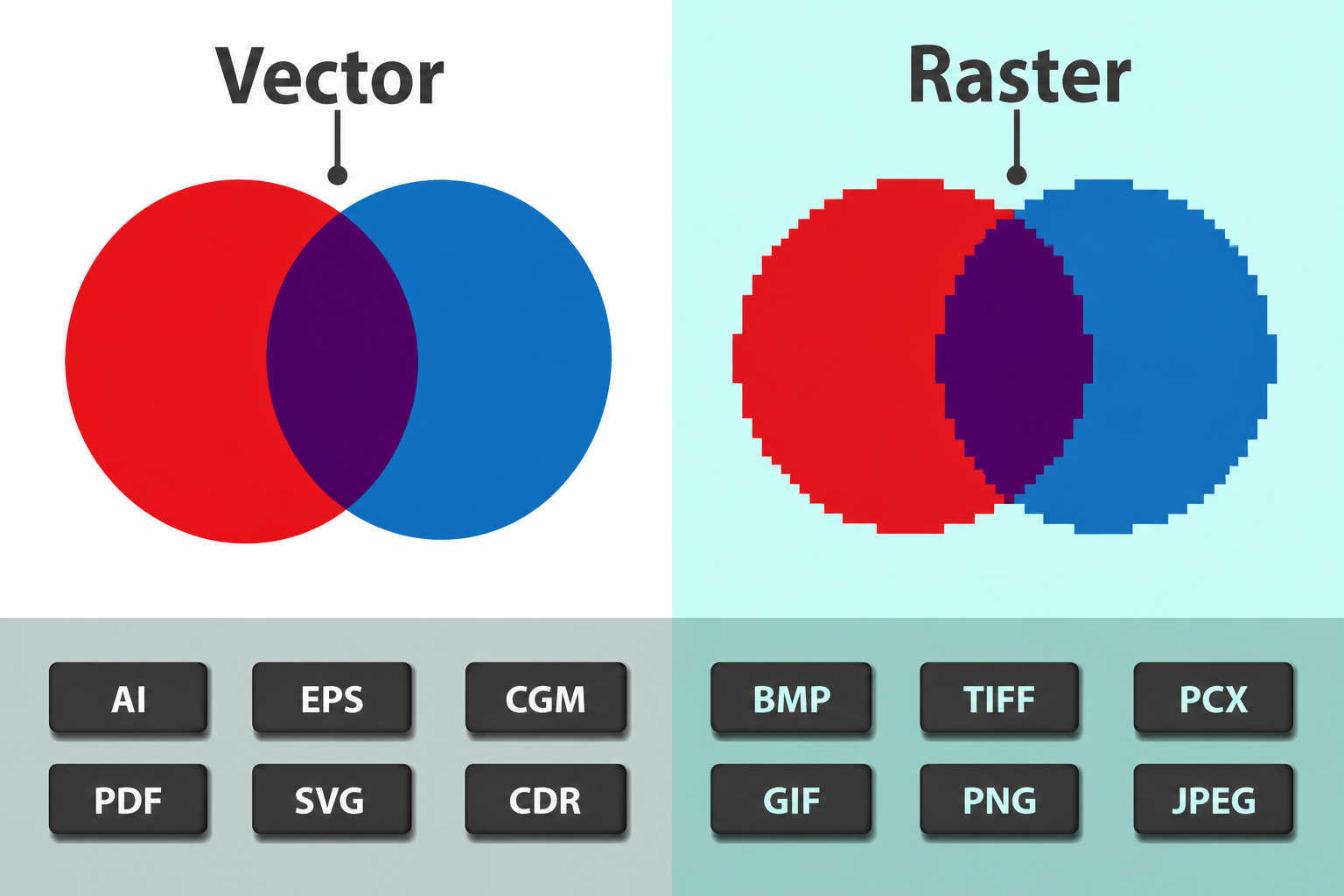
When you use a converter to turn a standard image into an EPS, you are essentially trying to bridge the gap between these two worlds. Designers love EPS because it’s "universal"—you can open it in Adobe Illustrator, CorelDRAW, or Inkscape, and it will usually behave perfectly.
The Benefits of Converting Images to EPS
Why bother with the conversion? Most people realize they need an EPS only when a professional printer asks for one. But there are several practical reasons to keep this tool in your back pocket:
-
Infinite Scalability: You can scale an EPS from the size of a postage stamp to the size of a billboard without a single pixel appearing.
-
Clean Printing: Printers handle vector data much better than pixels. It ensures your lines are crisp and your colors don't bleed or blur.
-
Transparent Backgrounds: Unlike JPEGs, which always have a solid background (usually white), EPS files support transparency, making them easy to layer over other designs.
-
Editability: If you convert a logo to EPS, you can often go in and change specific colors or move parts of the shape around—something that’s nearly impossible with a flat PNG.
How Does an Image to EPS Converter Work?
The process is called "tracing" or "vectorization." When you upload a file like a PNG to a converter, the software looks for edges and color shifts. It then tries to draw paths along those edges.
The Conversion Process
Step Action What Happens Internally 1 Upload The tool analyzes the resolution and color depth of your raster image. 2 Path Finding Algorithms detect "blobs" of color and create mathematical outlines. 3 Optimization The tool simplifies the number of points to keep the file size small. 4 Export The paths are wrapped in a PostScript language file (.eps).Best Practices for High-Quality Conversion
Not every conversion is going to look perfect on the first try. If you upload a grainy, dark photo of your cat, the EPS is going to look like a messy abstract painting. Here is how to get the best results:
Use High-Contrast Images
The converter needs to see where one color ends and another begins. Black logos on white backgrounds convert beautifully. Photos with lots of shadows and gradients are much harder to "vectorize" cleanly.
Clean Up the Original First
Before uploading to an image to EPS converter, crop out any unnecessary fluff. If there’s "noise" or speckles in the background, remove them in a basic photo editor first. The cleaner the input, the sharper the output.
Choose the Right Level of Detail
Many professional converters let you choose between "Low Detail" and "High Detail."
-
Low Detail: Good for simple logos; creates fewer points and smaller files.
-
High Detail: Necessary for complex illustrations, but can make the file heavy and slow to open.
Common Use Cases for EPS Files
While we live in a world dominated by web-friendly formats like WebP and SVG, the EPS format still holds its ground in several key industries.
Large Format Printing
If you are ordering a vinyl wrap for a car or a massive trade show backdrop, the print shop will almost certainly ask for an EPS or a PDF. They need the file to stay sharp at a scale of several feet.
Embroidery and Apparel
Interestingly, many computerized embroidery machines use vector paths to determine where the needle goes. Converting a logo to EPS is often the first step in getting a design ready for a hat or a hoodie.
Branding Kits
When a designer hands over a "brand package" to a client, it always includes an EPS version of the logo. This ensures the client can give that file to any vendor in the future—from a business card printer to a billboard company—without compatibility issues.
Troubleshooting Frequent Conversion Issues
Sometimes things go sideways. Here are a few "human" tips for when the conversion doesn't look right:
-
The "Spaghetti" Effect: This happens when the image is too complex. The converter creates thousands of tiny, jagged lines. Fix: Simplify your image or use a lower detail setting.
-
Missing Text: Converters sometimes struggle with fonts. They might turn a "B" into a weird blob. Fix: If you have the original design, it’s always better to "convert text to outlines" before saving, but if you're stuck with a flat image, you might need to manually touch up the EPS in a vector program.
-
File Size is Massive: If your EPS is 50MB, something is wrong. You likely have too many "nodes" or paths. Try running the conversion again with a "path simplification" setting turned on.
FAQs About Image to EPS Conversion
1. Can I convert an EPS back to a PNG?
Yes, easily. Opening an EPS in almost any image viewer will allow you to "Save As" or export it back to a raster format. However, you will lose the "infinite scaling" properties once you go back to pixels.
2. Does converting a low-quality JPEG to EPS make it high-quality?
Not exactly. It makes it scalable, but if the original was blurry, the converted version will just be a "sharp" version of a blurry shape. It won't magically add detail that wasn't there.
3. Is EPS better than SVG?
It depends on the use. SVG is better for websites and digital use because it’s lightweight and code-based. EPS is generally preferred for traditional print workflows and legacy design software.
4. Will the colors stay the same?
Mostly, but be careful. EPS files often use CMYK (the color space for printing), while your JPEGs use RGB (the color space for screens). You might notice a slight shift in vibrancy when you convert.
Final Thoughts
The jump from raster to vector is a massive milestone in any design project. Using an image to EPS converter is the easiest way to ensure your work stays professional, crisp, and ready for any medium. Whether you're a small business owner trying to fix a logo or a student working on a portfolio, mastering this conversion will save you hours of frustration and potentially expensive printing mistakes.